GST Registers II
Reports
1.B TO C STATE WISE 2.STATE WISE SALES 3.STATE WISE PURCHASE 4.HSN WISE SALES 5.HSN WISE Purchase 6.GSTR-1 ZERO RATED SALES 7.GSTR-2 ZERO RATED PURCHASE 8.Sales Return HSN Summary 9. Purchase Return HSN Summary 10. GST Item Details -> Sales 11. GST Item Details -> Purchase 12.HSN wise Sales Return 13. HSN wise Purchase Return 14. Sales Item Extract 15. Purchase Item Extract 16. GST Ledger TotalsB TO C STATEWISE
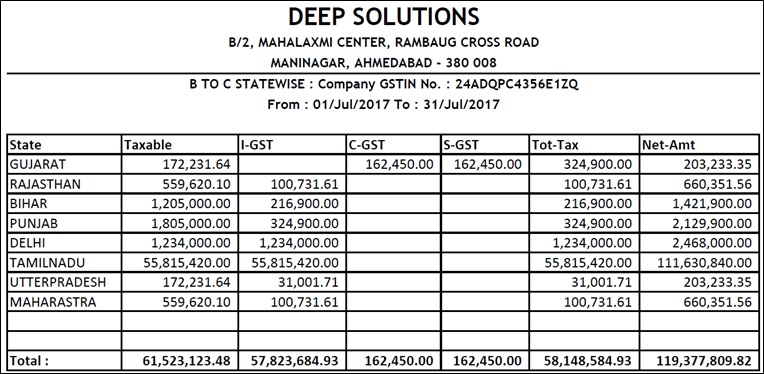
Unregistered dealers or the dealers who don't owns a GST number and sold their goods in another state can make entry in state wise column in GSTR-3B. They can also check the details of such entries in this menu.
अपंजीकृत डीलर या डीलर जिनके पास GST नंबर नहीं है और उन्होंने अपना माल दूसरे राज्य में बेचा है, वे GSTR-3B में राज्यवार कॉलम में प्रवेश कर सकते हैं। वे इस मेनू में ऐसी प्रविष्टियों का विवरण भी देख सकते हैं।
અનરજિસ્ટર્ડ ડીલરો અથવા ડીલરો કે જેઓ પાસે GST નંબર નથી અને તેમનો માલ બીજા રાજ્યમાં વેચ્યો છે તેઓ GSTR-3B માં રાજ્યવાર કૉલમમાં એન્ટ્રી કરી શકે છે. તેઓ આ મેનુમાં આવી એન્ટ્રીઓની વિગતો પણ ચકાસી શકે છે.
STATE WISE SALES
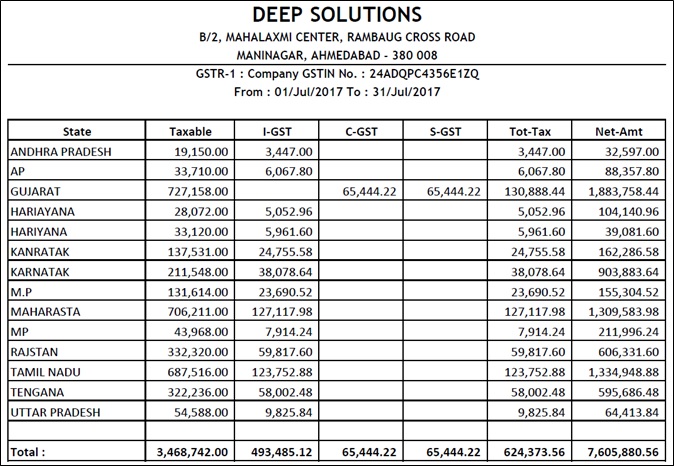
This menu is used to see a detailed state wise total of how much is sales .
इस मेनू का उपयोग राज्यवार कुल बिक्री का विस्तृत विवरण देखने के लिए किया जाता है।
આ મેનૂનો ઉપયોગ રાજ્ય મુજબનું કુલ વેચાણ કેટલું છે તે જોવા માટે થાય છે.
STATE WISE PURCHASE
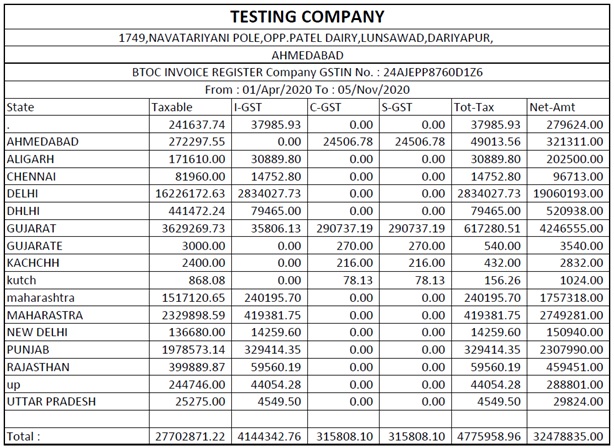
This menu is used to see a detailed state wise total of how much is sales.
इस मेनू का उपयोग राज्यवार कुल बिक्री का विस्तृत विवरण देखने के लिए किया जाता है।
આ મેનૂનો ઉપયોગ રાજ્ય મુજબનું કુલ વેચાણ કેટલું છે તે જોવા માટે થાય છે.
HSN WISE SALES
HSN Means : Harmonized System Nomenclature
HSN का अर्थ है: सुमेलित प्रणाली नामकरण
HSN અર્થ : સુમેળભર્યું સિસ્ટમ નામકરણ
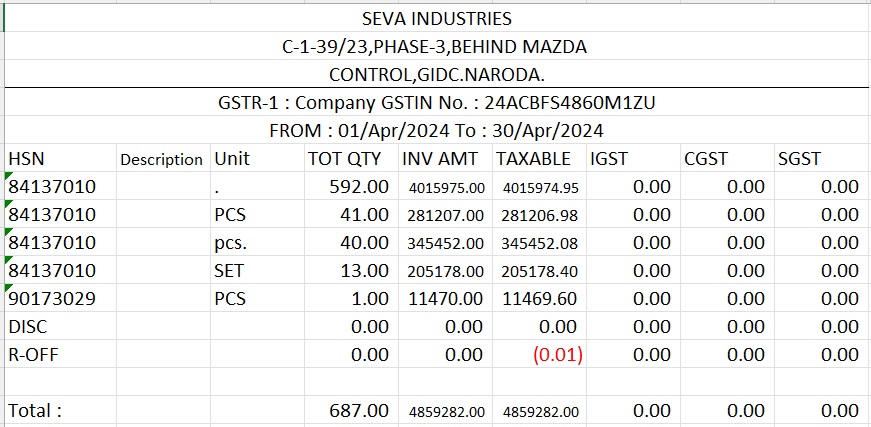
This menu is used to see a detailed HSN wise total of how much is sales .
इस मेनू का उपयोग विस्तृत HSN वार कुल बिक्री को देखने के लिए किया जाता है।
આ મેનૂનો ઉપયોગ HSN મુજબ કુલ કેટલું વેચાણ છે તે જોવા માટે થાય છે.
HSN WISE Purchase
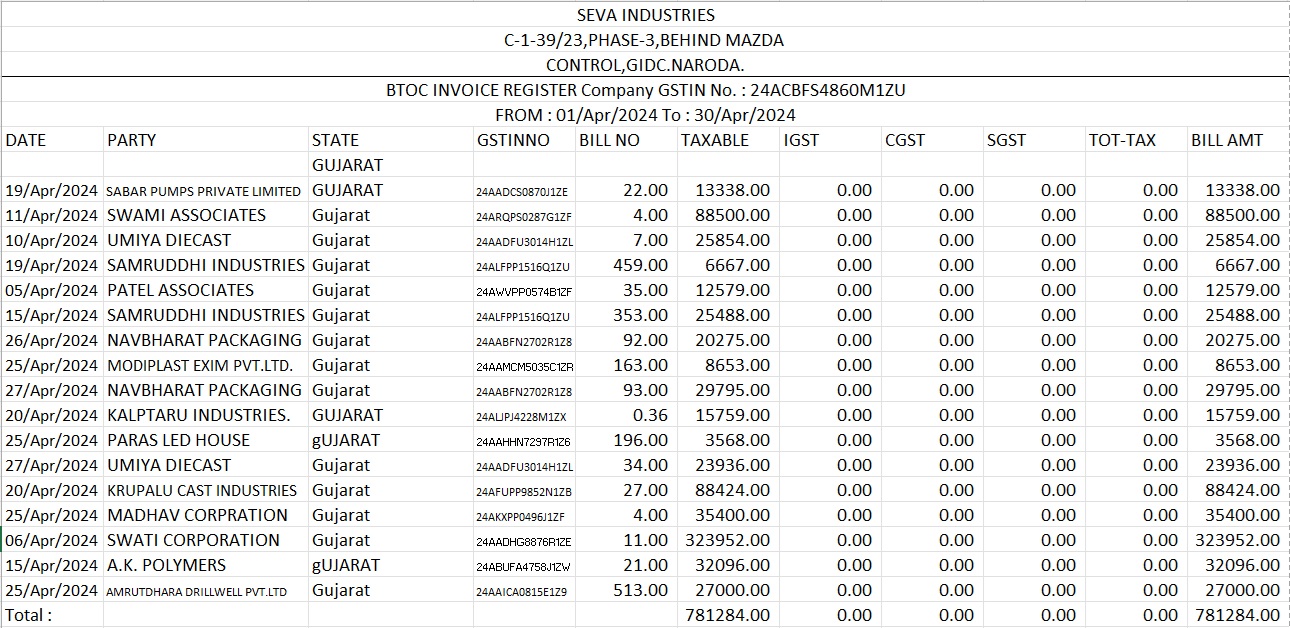
This menu is used to view or print the details hsn wise sum of how much has been purchased.
इस मेनू का उपयोग विवरण देखने या प्रिंट करने के लिए किया जाता है कि कितना खरीदा गया है।
આ મેનૂનો ઉપયોગ કેટલી ખરીદી કરવામાં આવી છે તેની hsn મુજબની વિગતો જોવા અથવા પ્રિન્ટ કરવા માટે થાય છે.
GSTR-1 ZERO RATED SALES
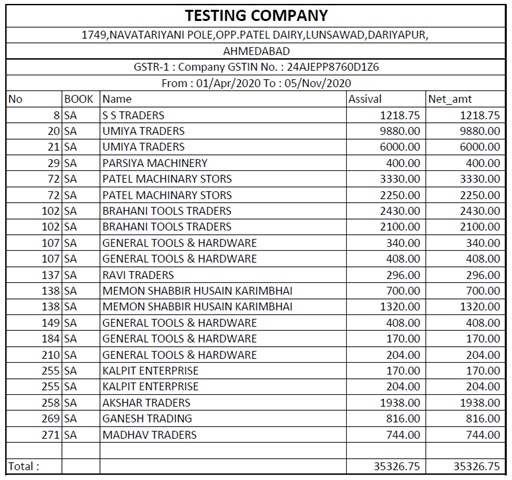
This report gives us the information of GST applied on the sales of Zero Rated tax bill.
यह रिपोर्ट हमें जीरो रेटेड टैक्स बिल की बिक्री पर लागू जीएसटी की जानकारी देती है।
આ રિપોર્ટ અમને ઝીરો રેટેડ ટેક્સ બિલના વેચાણ પર લાગુ GSTની માહિતી આપે છે.
GSTR-2 ZERO RATED PURCHASE
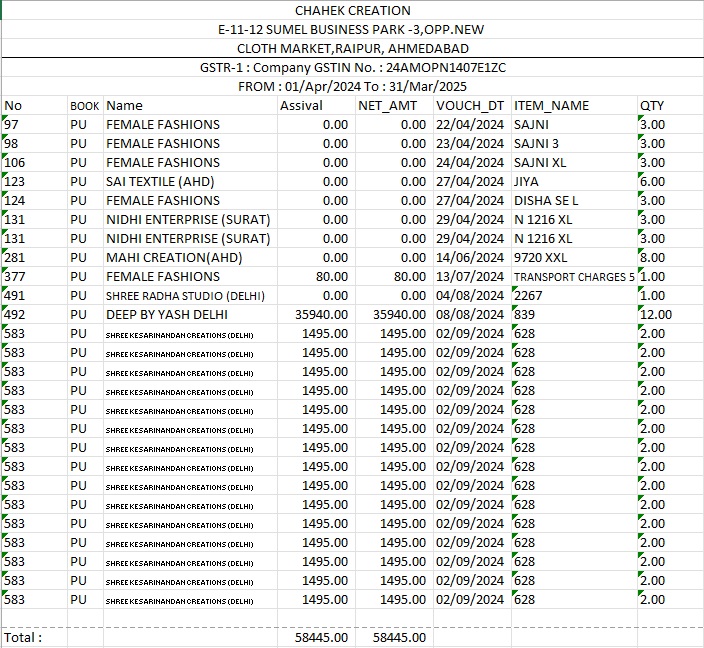
The ZERO RATED ITEM in the INVOICE. the item whose rate is ZERO and item has been purchased is the amount of the bill shown in this report..
इनवॉइस में जीरो रेटेड आइटम। जिस वस्तु का रेट जीरो है और वस्तु खरीदी गई है वह इस रिपोर्ट में दर्शाए गए बिल की राशि है।
ઇનવોઇસમાં શૂન્ય રેટેડ આઇટમ. આઇટમ જેનો દર ઝીરો છે અને આઇટમ ખરીદવામાં આવી છે તે આ રિપોર્ટમાં દર્શાવેલ બિલની રકમ છે.
Sales Return HSN Summary
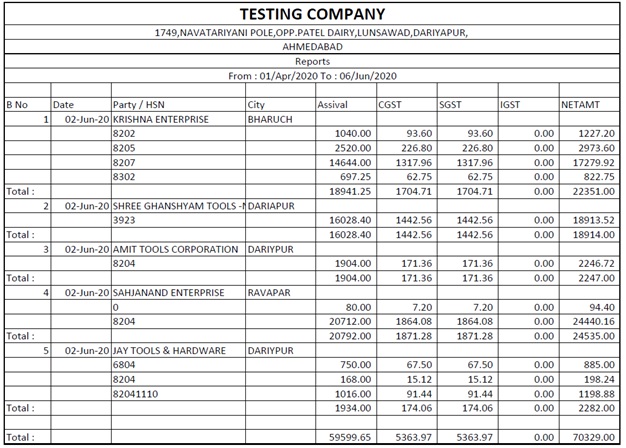
Codes of cart items have been decided by the government. A report on how many sales were returned in that code can be viewed through this menu.
कार्ट आइटम के कोड सरकार द्वारा तय किए गए हैं। उस कोड में कितनी बिक्री लौटाई गई, इस पर एक रिपोर्ट इस मेनू के माध्यम से देखी जा सकती है।
કાર્ટ વસ્તુઓના કોડ સરકાર દ્વારા નક્કી કરવામાં આવ્યા છે. આ મેનૂ દ્વારા તે કોડમાં કેટલા વેચાણ પરત કરવામાં આવ્યા તેનો અહેવાલ જોઈ શકાય છે.
Purchase Return HSN Summary
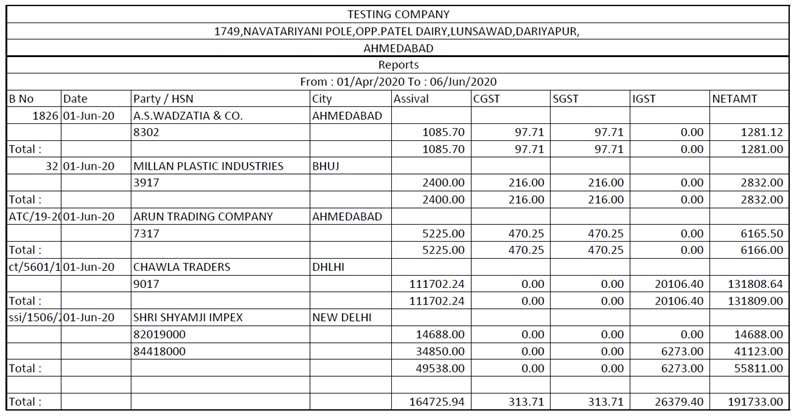
Codes of cart items have been decided by the government. A report on how many purchases are returned in that code can be viewed through this menu.
कार्ट आइटम के कोड सरकार द्वारा तय किए गए हैं। इस मेनू के माध्यम से उस कोड में कितनी खरीदारी वापस की जाती है, इसकी एक रिपोर्ट देखी जा सकती है।
કાર્ટ વસ્તુઓના કોડ સરકાર દ્વારા નક્કી કરવામાં આવ્યા છે. તે કોડમાં કેટલી ખરીદી પરત કરવામાં આવી છે તેનો અહેવાલ આ મેનૂ દ્વારા જોઈ શકાય છે.
GST Item Details -> Sales
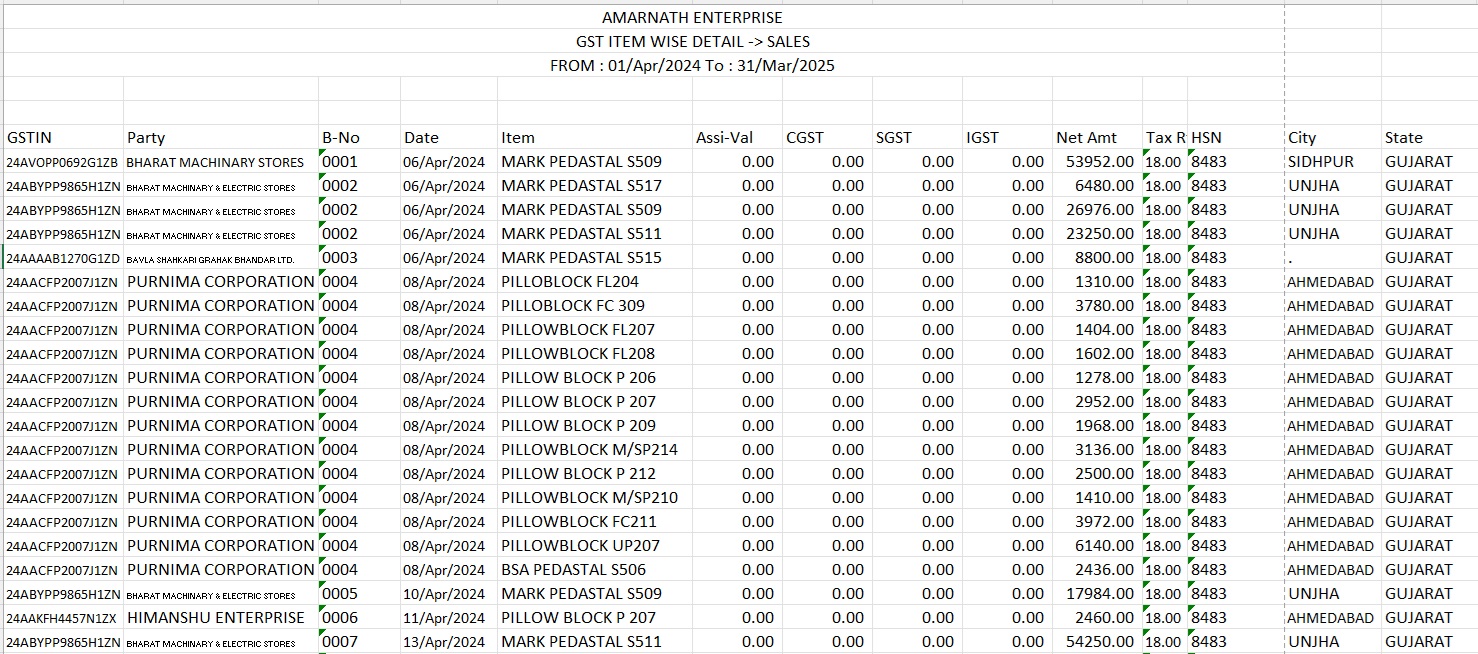
This menu is used to view the report with GST Item Details of how many sold.
इस मेनू का उपयोग जीएसटी आइटम विवरण के साथ रिपोर्ट देखने के लिए किया जाता है कि कितने बेचे गए।
આ મેનૂનો ઉપયોગ GST આઇટમ કેટલી વેચાઈ તેની વિગતો સાથેનો રિપોર્ટ જોવા માટે થાય છે.
GST Item Details -> Purchase
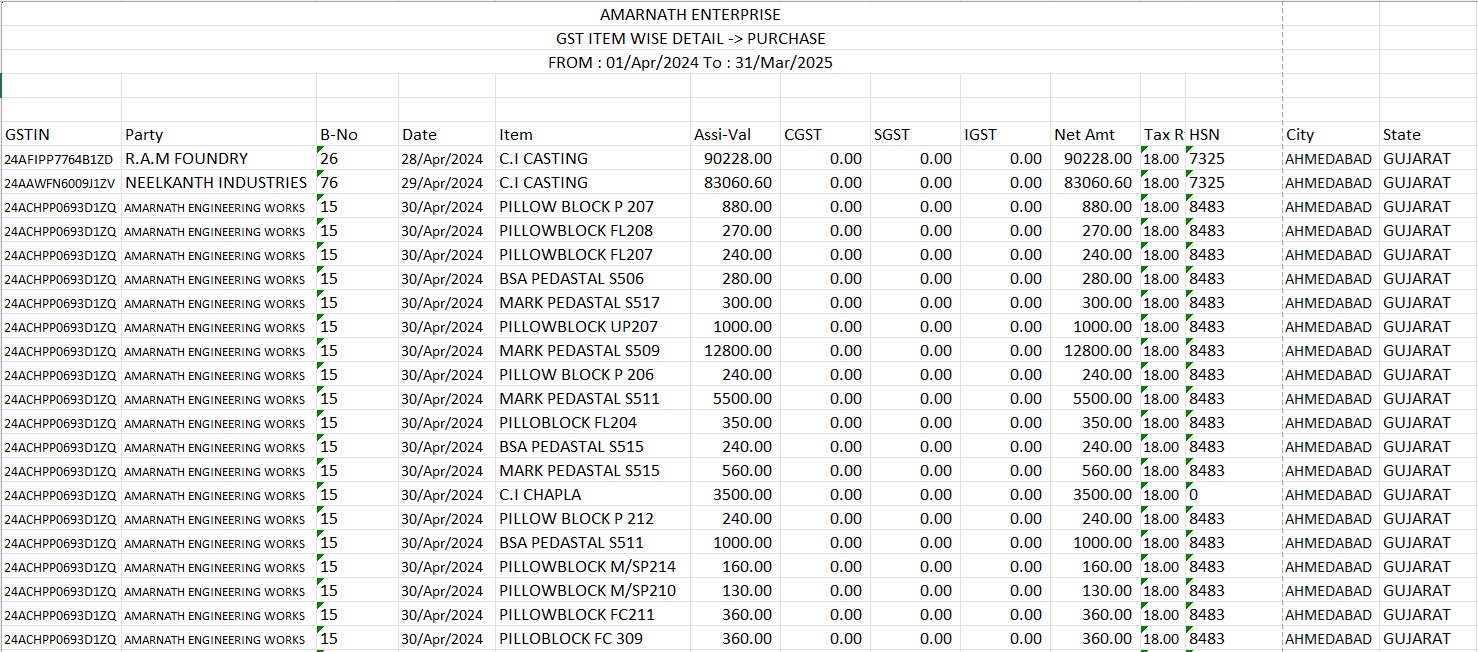
This menu is used to view the report with GST Item Details of how many purchased.
इस मेनू का उपयोग कितने खरीदे गए जीएसटी आइटम विवरण के साथ रिपोर्ट देखने के लिए किया जाता है।
આ મેનૂનો ઉપયોગ GST આઇટમ વિગતો સાથેનો અહેવાલ જોવા માટે થાય છે કે કેટલી ખરીદી કરવામાં આવી છે.
HSN wise Sales Return
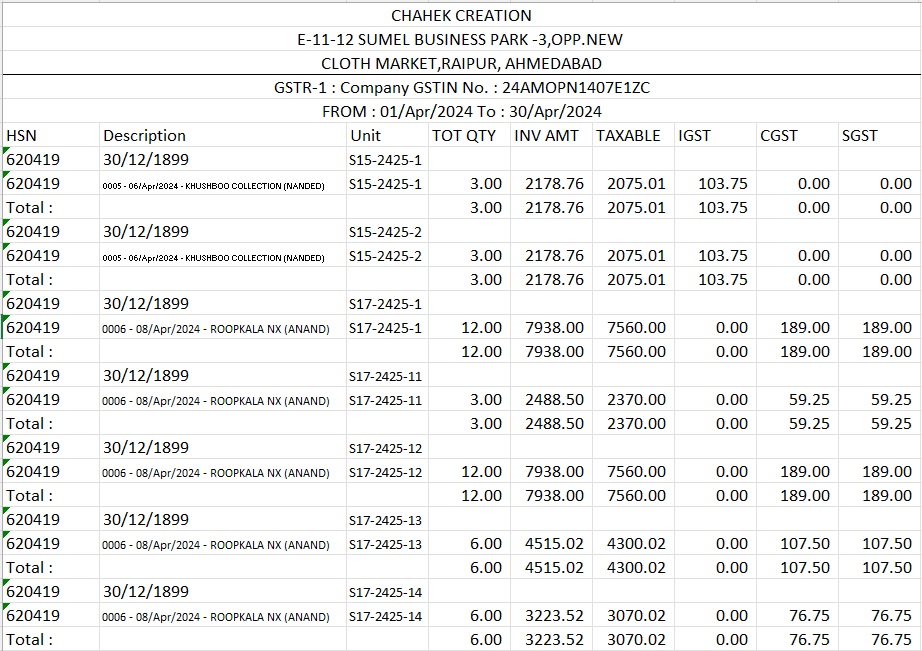
Codes of cart items have been decided by the government. A report on how many sales were returned in that code can be viewed through this menu. Codes of cart items have been decided by the government. A report on how many sales were returned in that code can be viewed through this menu.
कार्ट आइटम के कोड सरकार द्वारा तय किए गए हैं। उस कोड में कितनी बिक्री लौटाई गई, इस पर एक रिपोर्ट इस मेनू के माध्यम से देखी जा सकती है।
કાર્ટ વસ્તુઓના કોડ સરકાર દ્વારા નક્કી કરવામાં આવ્યા છે. આ મેનૂ દ્વારા તે કોડમાં કેટલા વેચાણ પરત કરવામાં આવ્યા તેનો અહેવાલ જોઈ શકાય છે.
HSN wise Purchase Return
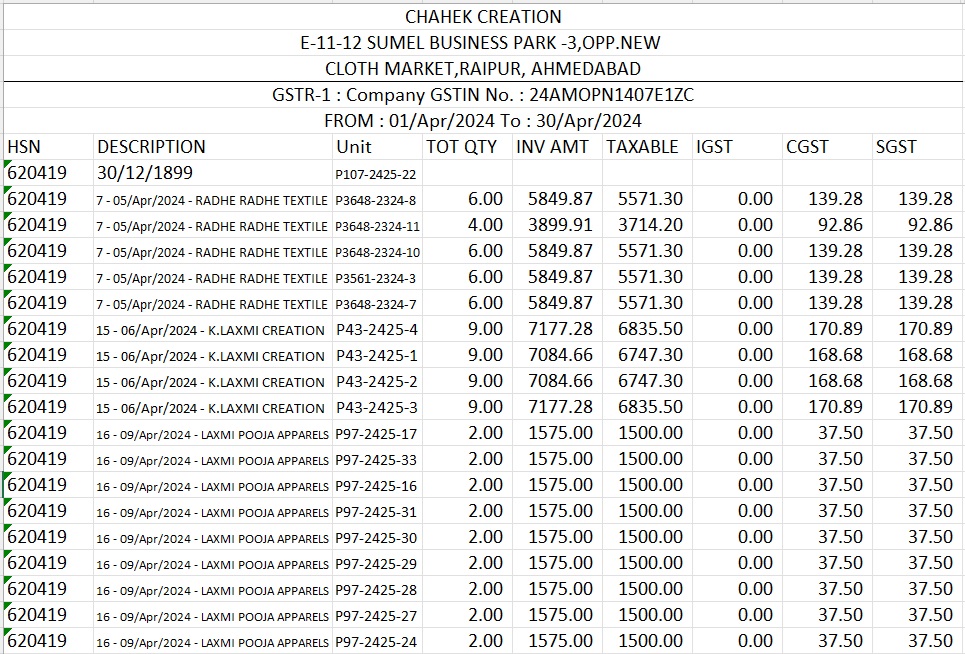
Codes of cart items have been decided by the government. A report on how many purchases are returned in that code can be viewed through this menu.
कार्ट आइटम के कोड सरकार द्वारा तय किए गए हैं। इस मेनू के माध्यम से उस कोड में कितनी खरीदारियां वापस की जाती हैं, इस पर एक रिपोर्ट देखी जा सकती है।
સરકાર દ્વારા કાર્ટ વસ્તુઓના કોડ નક્કી કરવામાં આવ્યા છે. તે કોડમાં કેટલી ખરીદીઓ પરત કરવામાં આવી છે તેનો અહેવાલ આ મેનૂ દ્વારા જોઈ શકાય છે.
Sales Item Extract
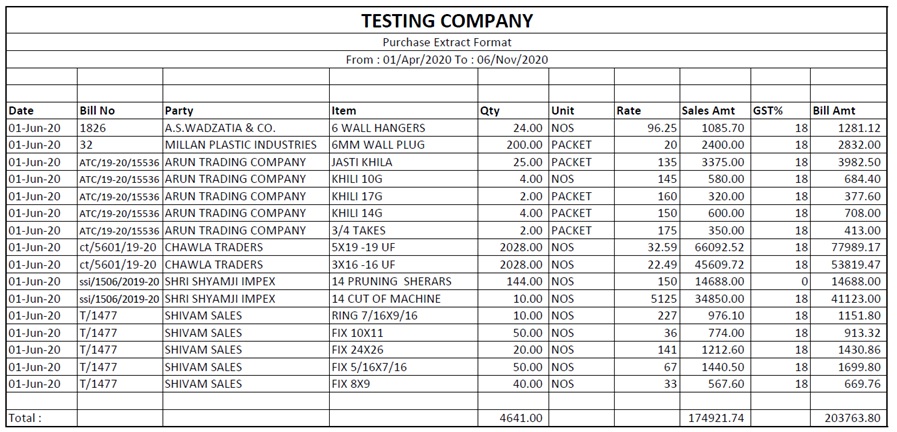
In this report the details of which party and which item was sold can be seen in which qty, rate, GST rate, GST amt.
इस रिपोर्ट में किस पार्टी और किस वस्तु को बेचा गया, इसका विवरण किस मात्रा, दर, GST दर, GST राशि में देखा जा सकता है।
આ અહેવાલમાં કઈ પાર્ટી અને કઈ વસ્તુ વેચાઈ તેની વિગતો જોઈ શકાશે કે કઈ રકમ, દર, GST દર, GST amt.
Purchase Item Extract
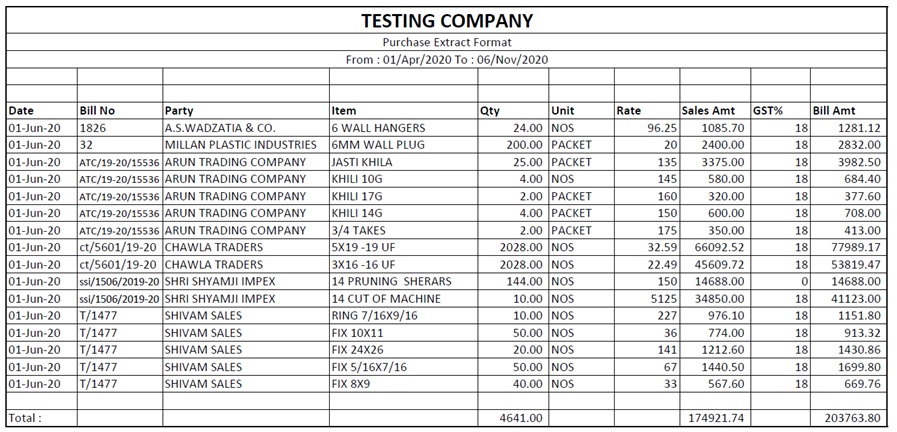
In this report, the details of which party and which item was purchased can be seen in which qty, rate, GST rate, GST amt.
इस रिपोर्ट में, किस पार्टी और किस वस्तु को खरीदा गया था, इसका विवरण देखा जा सकता है कि मात्रा, दर, जीएसटी दर, जीएसटी राशि।
આ અહેવાલમાં, કઈ પાર્ટી અને કઈ વસ્તુની ખરીદી કરવામાં આવી હતી તેની વિગતો જોઈ શકાશે કે કઈ જથ્થો, દર, GST દર, GST amt.
GST Ledger Totals
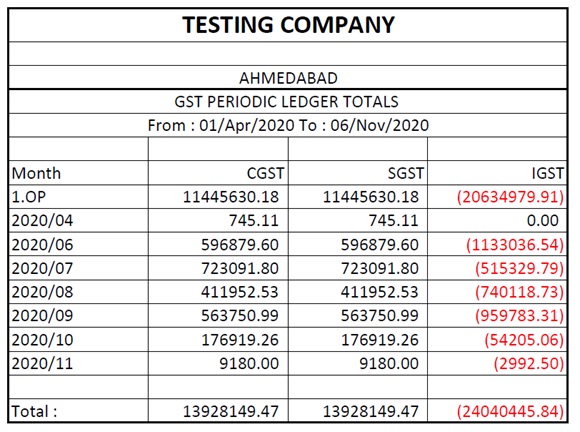
This menu is used to view and print the summayu report of how much GST has been input and how much has been output by month.
इस मेनू का उपयोग सारांश रिपोर्ट को देखने और प्रिंट करने के लिए किया जाता है कि कितना GST इनपुट किया गया है और कितना महीने के हिसाब से आउटपुट हुआ है।
આ મેનૂનો ઉપયોગ મહિને કેટલો GST ઇનપુટ થયો છે અને કેટલો આઉટપુટ થયો છે તેનો સુમાયુ રિપોર્ટ જોવા અને પ્રિન્ટ કરવા માટે થાય છે.

Saral
Accounting
Package
"One Step Solution For Computerized Accountancy"